
Download Blackberry SMS Messaging Software – Free SMS Tool for Windows, Secure Messaging, Bulk SMS, Desktop Messaging App
Looking for a reliable and efficient way to manage SMS messaging from your desktop? Blackberry SMS Messaging Software is a powerful, free Windows application designed to bring the full SMS experience directly to your computer. Whether you're staying in touch with family, managing business communications, or launching marketing campaigns, this software delivers seamless, secure, and real-time messaging. With a clean, intuitive interface, it allows users to send and receive SMS messages without relying on a mobile device. The tool supports message history, contact management, and instant notifications, ensuring you never miss an important message. Ideal for both personal and professional use, Blackberry SMS Messaging Software enhances productivity by centralizing your text communication. Regular updates keep the software compatible with the latest Windows versions, improving performance and strengthening security. Download this free messaging tool today and experience a smarter way to connect.
Seamless SMS Communication from Your Windows Desktop
One of the standout features of Blackberry SMS Messaging Software is its ability to transform your Windows PC into a fully functional SMS hub. Gone are the days of constantly checking your phone for messages. With this software, you can send and receive SMS directly from your desktop, making communication more efficient and convenient. The user interface is thoughtfully designed for ease of use—simple navigation, clear message threads, and a well-organized contact list ensure a smooth experience for both tech-savvy users and beginners.
Real-time notifications keep you updated instantly, so you won’t miss urgent messages. Whether it’s a quick text from a friend or a time-sensitive business update, the software delivers alerts right on your screen. The message history feature is another major advantage—it stores all your conversations securely, allowing you to search through past messages with ease. This is especially helpful for tracking customer inquiries, follow-ups, or personal conversations over time.
For professionals, the ability to manage multiple contacts and organize them into groups streamlines communication. You can also set up templates for frequently used messages, saving valuable time. The software supports integration with USB-connected BlackBerry devices or simulators, making it ideal for developers and businesses testing SMS workflows. With regular updates and a strong focus on performance, Blackberry SMS Messaging Software continues to evolve, ensuring long-term reliability and compatibility with modern Windows systems.
Powerful Features for Personal and Business Use
Blackberry SMS Messaging Software goes beyond basic messaging by offering a suite of advanced tools tailored for both individual users and organizations. One of the most valuable features is bulk SMS messaging, which allows users to send the same message to multiple recipients at once. This is a game-changer for small businesses, event organizers, and marketing teams who need to reach a wide audience quickly and efficiently. Whether it’s a promotional offer, appointment reminder, or emergency alert, you can deliver your message to hundreds of contacts with just a few clicks.
The software also includes contact management tools that let you import, export, and categorize contacts with ease. You can create custom groups (e.g., “Family,” “Clients,” “Team”) and send messages to entire groups in one go. Message templates further enhance efficiency—save common replies like “Thanks for your message!” or “Your order is confirmed” for instant reuse. This feature is especially useful in customer service environments where speed and consistency matter.
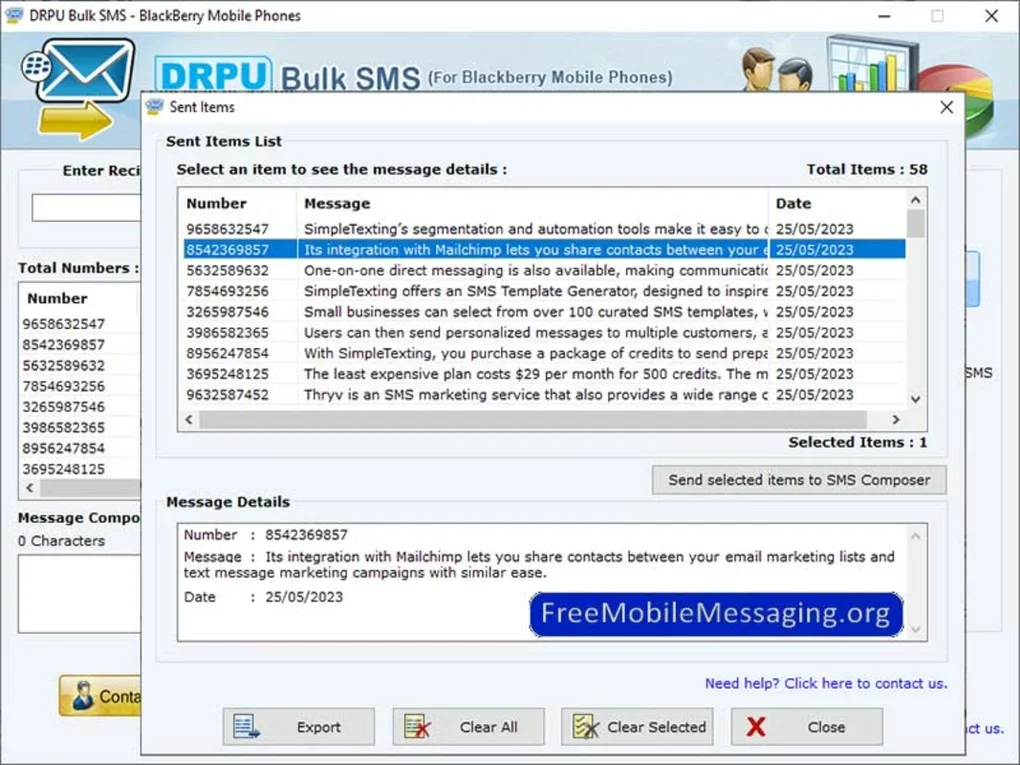
For added security, the software encrypts message data and ensures secure transmission when connected via trusted devices. It supports both direct device connection and simulated SMS environments, making it a flexible tool for developers and testers. The program also logs all sent and received messages, providing a transparent audit trail—critical for compliance and record-keeping in regulated industries. With scheduled messaging and delivery reports, users can track message status and optimize their outreach strategies. All these features are packed into a lightweight, free application that runs smoothly on modern Windows systems.
Easy Installation, Setup, and Compatibility
Getting started with Blackberry SMS Messaging Software is quick and hassle-free. The download is available for free from the official website, and the installation process takes less than two minutes. Once downloaded, simply run the installer, accept the terms, and follow the on-screen instructions. The software doesn’t require administrative privileges in most cases, making it accessible even in restricted work environments.
After installation, launch the app and connect your BlackBerry device via USB or use the built-in simulator for testing. The software automatically detects the device and establishes a secure connection. If you're using the simulator, you can send test messages without needing a physical phone. The setup wizard guides you through initial configuration, including setting up default contacts, notification preferences, and message storage locations.
Blackberry SMS Messaging Software is compatible with Windows 7, 8, 10, and 11, ensuring broad accessibility across different systems. It supports both 32-bit and 64-bit architectures, so users with older or newer machines can benefit from the tool. While the software is primarily designed for Windows, some users have reported success using compatibility layers like Wine on Linux, though official support is limited. For Mac users, there is no native version, but third-party virtualization tools can be used to run the Windows version. The software does not currently offer native apps for Android or iOS, but its desktop focus makes it ideal for Windows users who want a powerful SMS management tool.
Pros and Cons: Is Blackberry SMS Messaging Software Right for You?
- Pros:
- Free to download and use with no hidden fees
- Intuitive, user-friendly interface for easy navigation
- Supports bulk SMS messaging for business and marketing
- Secure message encryption and data protection
- Real-time notifications and message history
- Regular updates for improved performance and security
- Excellent for developers and testers using SMS simulators
- Cons:
- No native versions for Mac, Android, or iOS
- Requires a physical BlackBerry device or simulator for full functionality
- Interface may feel outdated compared to modern messaging apps
- Limited customization options for themes and layout
- Support is primarily community-based, with no official 24/7 helpdesk
Frequently Asked Questions (FAQ)
Is Blackberry SMS Messaging Software free to download?
Yes, Blackberry SMS Messaging Software is completely free to download and use. There are no subscription fees or hidden charges. The software is offered at no cost to promote accessibility and ease of use for both personal and business users.
Can I send bulk SMS messages using this software?
Absolutely. One of the key features is bulk SMS messaging, allowing you to send the same message to multiple recipients simultaneously. This is ideal for marketing campaigns, event reminders, and customer notifications.
What operating systems does it support?
The software is officially supported on Windows 7, 8, 10, and 11 (both 32-bit and 64-bit). There is no native Mac, Android, or iOS version, but Windows-based virtualization tools can be used to run it on other platforms.
Do I need a physical BlackBerry phone to use it?
While a physical BlackBerry device connected via USB enhances functionality, the software also includes a built-in SMS simulator. This allows you to test and send messages without needing a real phone, making it perfect for developers and testers.
How often is the software updated?
The developers release regular updates to improve performance, fix bugs, and enhance security. These updates ensure compatibility with new Windows versions and address user feedback promptly.
Conclusion: A Reliable SMS Tool for Windows Users
If you're a Windows user looking to streamline your SMS communication, Blackberry SMS Messaging Software is a solid choice. It combines essential messaging features with advanced tools like bulk SMS and contact management, all in a free, secure package. Whether you're managing personal conversations or running a small business, this software offers a desktop solution that enhances efficiency and keeps you connected.
While it lacks native support for Mac, Android, and iOS, its strong Windows compatibility and regular updates make it a dependable tool. The inclusion of a simulator is a major plus for developers and testers. Despite a slightly dated interface and limited customization, the software delivers real value for its intended audience.
Download Blackberry SMS Messaging Software today and experience seamless, secure SMS communication from your desktop. It’s the perfect free tool for anyone who wants to manage text messages without being tied to their phone.







